Your AI agents, with your rights.
Connect Claude, Codex CLI or Gemini CLI to your WordPress site by pasting an address, with no key to copy and no password to share.
Site Agent MCP is a WordPress plugin (GPL license, free beta) that turns your site into a remote MCP server protected by OAuth 2.1. MCP, the Model Context Protocol, is the open protocol through which AI applications use external tools. Agents connect with the WordPress rights of the account that approves the connection, checked on every call. Tested with Claude; the other clients are not tested yet.
- 112 KB ZIP
- WordPress 6.9 or later
- PHP 7.4 or later
- GPL license
Whatever your account can do, an agent can do.
No more. The WordPress rights of the account that authorizes the connection are checked on every call.
Your site and all its plugins
The agent takes the most reliable route that exists for each plugin, and tells you which one it took.
- The whole REST API of WordPress and of the installed plugins.
- The “abilities” that WordPress and plugins declare.
- Plugin settings, and their admin screens read as forms, with a preview before sending.
- Plugins, themes and core updates.
- A change log, with undo for settings and files.
Evidence-based SEO and GEO
Page audits, Search Console, PageSpeed, Chrome UX Report, GTmetrix, IndexNow. No invented E-E-A-T score, no promised gains.
Security first
When an administrator connects, the agent runs a read-only audit and presents it to you before any other work.
Full backups
Database and files, in small steps that fit on shared hosting. Only an administrator can restore, never an agent.
Server access, on request
Files, SQL, PHP and WP-CLI, offered to administrators box by box, unchecked by default.
Guardrails the agent cannot get around.
Instructions given to agents remain advice. What follows, on the other hand, is enforced by the plugin itself.
- OAuth 2.1 connection with PKCE: you sign in on your own site and approve the connection.
- The WordPress capabilities of your account decide everything, call by call.
- A site that forbids file editing keeps forbidding it.
- Your Google and GTmetrix keys stay on the site, hidden from agents.
- Every connection can be revoked in one click, and every call is logged.
Installed in three steps.
No extra server: the plugin runs inside your WordPress, shared hosting included.
-
Upload the ZIP
Plugins › Add New › Upload Plugin, then activate Site Agent MCP.
-
Copy the address
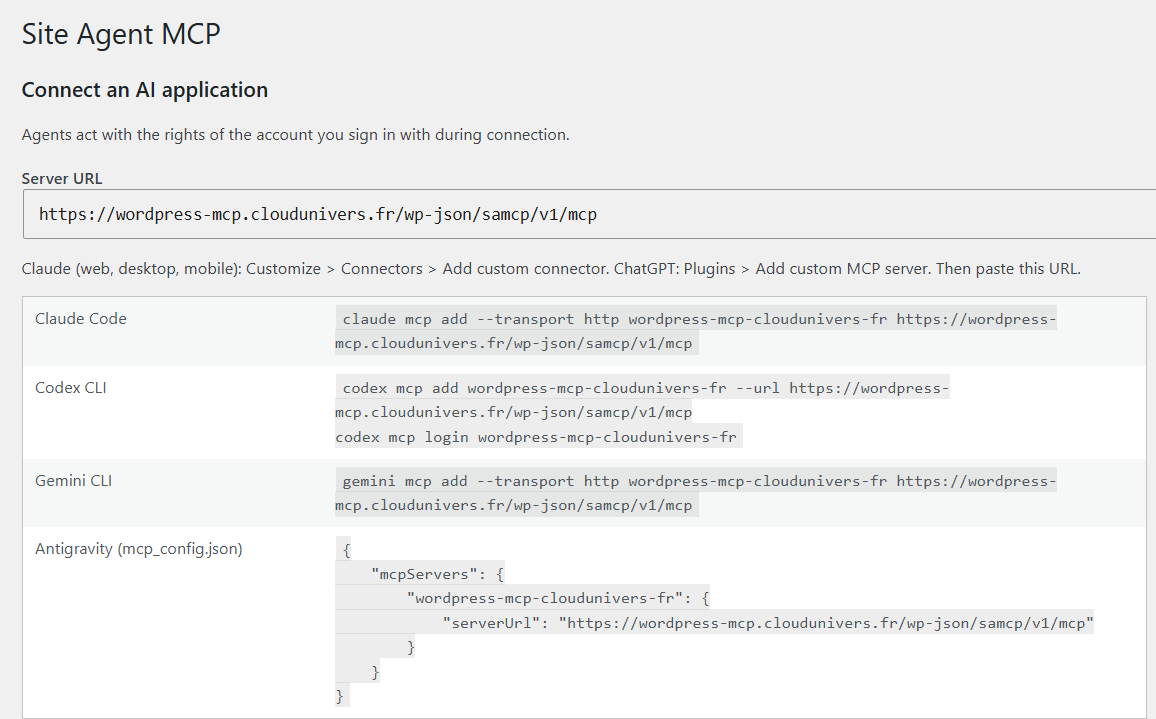
Tools › Site Agent MCP shows the server address and the command for each client.
-
Connect your AI
Paste the address, sign in to WordPress and approve. For example:
# Claude Code
claude mcp add --transport http my-site https://your-site.com/wp-json/samcp/v1/mcp
Claude (web, desktop, mobile): Customize › Connectors › Add custom connector. Codex CLI, Gemini CLI and Antigravity: see the documentation.
What is tested, and what is not yet.
This is a beta. Status as of 2026-11-12 (v0.4.1). Earlier releases are in the release log, and what the plugin sends to whom is detailed on the data page.
- 375 end-to-end tests passed on WordPress 7.1.4, with Yoast, Rank Math, Wordfence and WP Super Cache actually installed.
- A real Claude client connected to a site over HTTPS, with real Search Console, PageSpeed and GTmetrix.
- Not tested yet: Nginx, multisite, and the Codex, Gemini CLI and Antigravity clients.
- Backups stay on your server, unencrypted, and restore to the same place. Moving to another server comes later.
- An agent can ignore an instruction. Test on a copy of your site first.
Frequently asked questions
What is an MCP server?
The Model Context Protocol is an open protocol that lets an AI application use the tools of a service. With this plugin, your WordPress site becomes such a service: the agent sees tools there (read a page, change a setting, run an audit) and calls them when you ask it to.
Do I need a server on top of my hosting?
No. The plugin runs inside WordPress, shared hosting included. Your site must use HTTPS for AI applications to agree to connect to it.
What rights does the agent have?
Those of the WordPress account that approves the connection, no more and no less, checked on every call. An editor connects an agent that can only do what an editor can do. Access to files, SQL, PHP and WP-CLI is a separate option, offered to administrators only and unchecked by default.
Are my Google and GTmetrix keys exposed to the agent?
No. They stay in your site’s database and the tools never return them. The agent only sees whether a service is configured.
What if the agent ignores an instruction?
Instructions given to agents remain advice. The real limits are WordPress rights, the OAuth connection and the plugin’s refusals. Setting and file changes are logged and can be undone; SQL writes cannot. Test on a copy of the site first.
How do I cut off an agent’s access?
In the plugin screen, every connection has a button to revoke it. The agent loses access immediately.
Are backups encrypted?
Not yet. They stay on your server, outside the public folder when the hosting allows it, otherwise in a protected folder with an unpredictable name. Download them and delete them from the server if you prefer.
Try the beta on your site.
Free during the beta. Version 0.4.1, released on November 12, 2026.
SHA-256: af78d48ee5ba442cbc29db4593f497b7d24ca528d4f864d9c757b7004e15bdaf